
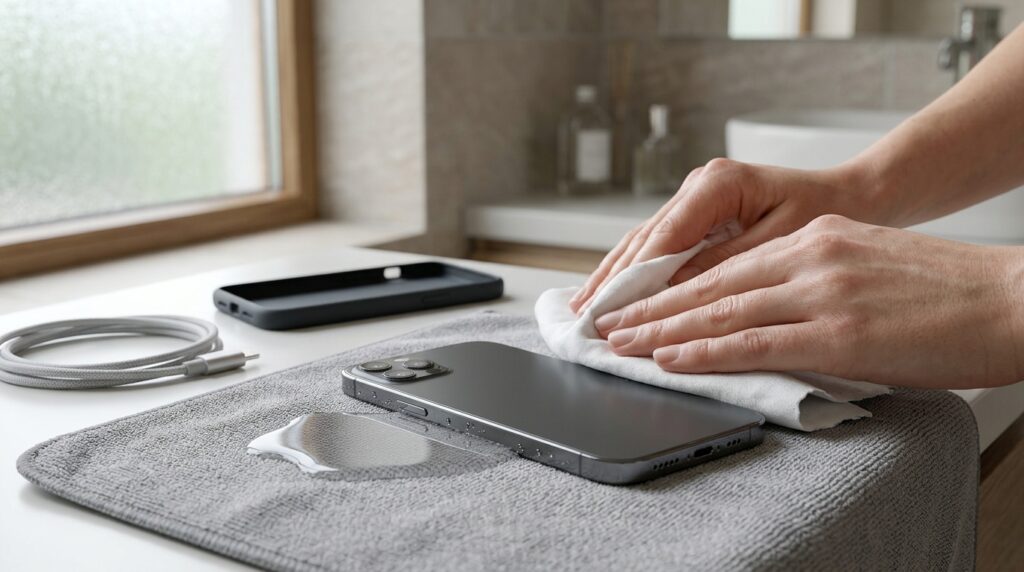
Accidentally dropping your phone into water can be stressful. It might happen in a sink, during a rainstorm, or beside a swimming pool. Even a small amount of moisture can affect delicate electronic components. However, taking the right steps immediately can reduce potential damage and protect your important data.
The most important thing is to stop using the device and avoid actions that could worsen the problem. If your phone continues malfunctioning after exposure to moisture, professional assessment may be necessary. Services such as water damaged phone repair Edmonton can help identify moisture-related problems and determine suitable repair options. Acting carefully from the beginning may improve the chances of recovering a damaged device.
1. Remove Your Phone From the Water Immediately
If your phone falls into water, retrieve it as quickly as possible. The longer it remains submerged, the greater the opportunity for moisture to enter openings and damage internal components.
However, avoid putting yourself at risk while retrieving the device. Never reach into dangerous electrical situations or unstable water to recover a phone.
Once you have retrieved it, hold the device securely. Avoid shaking it vigorously or pressing unnecessary buttons. These actions may move moisture toward other internal areas.
If the phone has fallen into saltwater, pool water, or a sugary drink, the situation may be more complicated. These liquids can leave corrosive or sticky residues behind. Therefore, professional cleaning may be needed even if the device initially appears functional.
2. Turn Off the Phone Immediately
If your phone remains switched on, power it off as soon as you can do so safely. Electricity flowing through moisture-contaminated components can increase the risk of short circuits.
Do not spend time testing the camera, touchscreen, speakers, or charging functions. These checks provide little benefit while the device may still contain moisture.
If the screen does not respond, avoid repeatedly pressing buttons to force a shutdown. Instead, stop interacting with the device and seek appropriate repair advice.
A phone that switches off unexpectedly after getting wet should remain off. Do not assume that it is safe simply because the display has gone dark.
Importantly, do not turn the phone back on just to check whether it has dried. Moisture can remain inside even when the exterior feels completely dry.
3. Disconnect the Charger and Accessories
If your phone is connected to a charger, disconnect the power source only when it is safe. Never handle exposed electrical connections while standing in water or facing an electrical hazard.
Once the device is away from the water, remove charging cables, wired headphones, and other connected accessories. External accessories can hold moisture near ports and connectors.
Do not connect the phone to a computer to check whether it is recognized. Similarly, avoid inserting a charging cable to see whether the battery still works.
Charging a wet phone can cause electrical damage or corrosion around the connector. Some devices display liquid-detection warnings when moisture is present. Treat these warnings seriously and follow the manufacturer’s guidance.
If the charging port appears wet, allow it to dry naturally in a suitable environment. Never insert metal objects, cotton swabs, or paper into the connector.
4. Remove the Phone Case and External Accessories
Phone cases can trap water around the device’s edges. Removing the case helps expose these areas and makes the exterior easier to dry.
Take off removable accessories, such as external grips or protective covers. If your phone has a removable battery and the manufacturer permits safe removal, follow the official instructions.
However, most modern smartphones have sealed designs. Do not attempt to open the device or remove internal components without suitable expertise.
If your phone uses a physical SIM card, remove it only if you can do so safely. Dry the SIM tray and card gently with a clean, lint-free cloth.
Avoid forcing the tray out when it appears stuck. Water exposure may affect the surrounding components, and unnecessary pressure could create further damage.
5. Dry the Exterior With a Soft Cloth
After removing the case, gently wipe the phone with a clean, soft, lint-free cloth. Focus on the screen, back panel, and exterior edges.
Use gentle dabbing motions rather than rubbing aggressively. This helps remove surface moisture without applying unnecessary pressure.
Pay attention to areas around the buttons and charging port. However, do not push the cloth into openings or use sharp objects to remove water.
Keep the device positioned so that visible moisture can drain away from its openings, following the manufacturer’s guidance. Avoid shaking the phone, since this may spread liquid internally.
Do not use paper towels that break apart easily or leave fibers behind. A microfiber cloth is generally a suitable choice for gently drying external surfaces.
Remember that wiping the outside does not remove moisture trapped inside the phone. Internal drying and inspection may still be necessary.
6. Avoid Using Rice to Dry Your Phone
Placing a wet phone in rice is a widely shared suggestion. However, rice is not a reliable way to remove moisture from internal components.
Small particles and dust can also enter the charging port or other openings. Additionally, rice cannot remove corrosive residues left by saltwater or sugary liquids.
Instead, leave the phone in a dry, well-ventilated area. Follow the manufacturer’s recommendations for handling moisture exposure.
Do not bury the device in flour, cereal, or other household materials. These substances can create additional contamination without addressing the underlying problem.
If liquid exposure was significant, professional assessment is often more appropriate than relying on household drying methods. A technician can inspect affected components and identify potential corrosion.
7. Never Use a Hairdryer or Direct Heat
Heat may seem like a quick way to dry a wet phone. Nevertheless, using a hairdryer, heater, oven, or direct sunlight can cause additional problems.
Excessive heat may affect adhesives, seals, batteries, displays, and other sensitive components. Strong airflow can also push moisture deeper into openings.
Avoid placing the phone on a radiator or using a heat gun. Do not attempt to dry the device by leaving it inside a hot vehicle.
Instead, allow the exterior to dry naturally in a cool, dry location. Keep the phone away from direct sunlight and other heat sources.
Patience is important because moisture may take time to evaporate. Even then, natural drying does not guarantee that internal components are free from liquid damage.
8. Do Not Charge the Phone Until It Is Dry
Charging a wet phone is one of the most important mistakes to avoid. Moisture inside a connector can interfere with electrical contact and increase the risk of damage.
If your device displays a liquid-detection alert, do not ignore it. Disconnect the cable and follow the manufacturer’s instructions.
Avoid repeatedly plugging in the charger to see whether the warning disappears. Also, do not use compressed air to force moisture out of the charging port.
Wireless charging should not be treated as an automatic workaround. Moisture may remain inside the device, even if the wireless charging surface appears dry.
Wait for the device and connector to dry according to official guidance. If the phone was submerged or exposed to contaminated liquid, seek professional advice before charging.
9. Understand That Water Resistance Has Limits
Some smartphones include water-resistance ratings. However, these ratings do not mean a device is completely waterproof under every condition.
Water resistance can vary by model and may decrease over time. Drops, cracks, repairs, and ordinary wear can affect protective seals.
Furthermore, resistance ratings generally apply under specific laboratory conditions. They may not cover saltwater, soap, swimming pools, hot water, or pressurized liquid.
Even a phone with a water-resistance rating can suffer damage after accidental immersion. Therefore, do not assume that the device is safe because the manufacturer advertises water resistance.
If liquid enters the phone, follow the same cautious steps. Power it off, disconnect accessories, dry the exterior, and avoid charging until it is safe.
10. Watch for Signs of Internal Water Damage
Water damage does not always appear immediately. Some devices continue working initially but develop problems later.
Watch for unusual symptoms after the incident. These may include:
- A screen that flickers or develops dark patches.
- Speakers that sound muffled or distorted.
- Buttons that stop responding correctly.
- Charging problems or unexpected battery drain.
- Cameras that appear foggy inside the lens.
- Random restarts or sudden shutdowns.
- Overheating during ordinary use.
- Unusual alerts or unreliable connectivity.
These symptoms do not automatically prove water damage. However, they deserve attention when they begin after liquid exposure.
If any warning signs appear, stop using the device and seek professional assessment. Continuing to operate a damaged phone may increase the risk of further faults.
11. Protect Your Data and Important Information
Your phone may contain family photographs, work documents, messages, and account information. Protecting this data is important after an accidental spill.
If the phone is still wet or behaving abnormally, do not turn it on just to create a backup. Electrical activity may worsen the damage.
Instead, check whether your information is already available through an existing cloud backup. Apple iCloud and other supported backup services may contain recent copies of your data.
You can review available backups using another trusted device. Avoid entering account details on unfamiliar websites or following suspicious recovery links.
If the phone becomes functional again after appropriate assessment, create a backup as soon as it is safe. A repair technician may also advise you about data preservation options.
Never assume that a repaired device will retain every file. Regular backups are the best protection against unexpected hardware failures.
12. Seek Professional Assessment After Significant Exposure
Professional help is particularly important when a phone has been submerged, exposed to saltwater, or soaked by a sugary drink. These liquids may cause corrosion even after visible moisture disappears.
A technician can inspect the device for signs of internal contamination. Depending on the findings, the repair process may involve cleaning, component testing, or replacing damaged parts.
Tell the technician what happened and how long the device was exposed. Mention whether it was powered on, connected to a charger, or behaving strangely afterward.
This information helps guide the assessment. It can also prevent unnecessary troubleshooting steps that might worsen the damage.
Avoid opening a sealed smartphone yourself. Modern devices contain delicate connectors, adhesives, and batteries that require appropriate tools and handling.
Prompt professional assessment may improve the chances of identifying damage before it spreads. However, no repair method can guarantee recovery in every case.
13. Take Extra Care With Saltwater and Other Liquids
Not all liquids affect phones in the same way. Freshwater exposure can be serious, but saltwater and sugary beverages may create additional problems.
Salt can leave conductive residues and encourage corrosion. Sugary drinks may leave sticky deposits that interfere with buttons and connectors.
Pool water can contain chemicals that affect materials and internal components. Soap and other household liquids may also leave residues after drying.
If your phone falls into one of these liquids, do not rinse it under a tap unless the manufacturer specifically directs you to do so. Additional liquid may enter damaged seals or openings.
Power off the device, disconnect accessories, dry the exterior, and arrange professional advice. Mention the exact liquid involved, since this information can influence the recommended approach.
How to Prevent Future Water Damage
Although accidents happen, a few precautions can reduce the likelihood of future problems.
Consider these habits:
- Keep your phone away from sinks and bath edges.
- Avoid using it near swimming pools or open containers.
- Use a suitable protective case when appropriate.
- Keep drinks away from your desk and charging area.
- Store your device securely during rainy weather.
- Check your phone for cracks that may affect its protection.
- Back up important information regularly.
- Never assume water resistance makes your phone waterproof.
These precautions cannot eliminate every risk. However, they can reduce exposure to common sources of liquid damage.
Frequently Asked Questions
Should I turn off my phone after it gets wet?
Yes. If you can do so safely, power it off promptly and disconnect accessories. Avoid repeatedly pressing buttons or turning it back on to test its condition.
How long should I wait before charging a wet phone?
Follow the manufacturer’s instructions for your specific model and charging connector. Apple, for example, advises waiting at least five hours before charging an iPhone with a liquid-detection alert, while drying can take longer. If the phone was submerged or shows signs of damage, seek professional advice before charging.
Can a water-damaged phone work again?
Yes, some phones can be restored after liquid exposure. The outcome depends on the liquid, exposure duration, affected components, and how quickly appropriate steps are taken.
Is putting a wet phone in rice effective?
Rice is not a reliable solution for removing internal moisture. It may also introduce particles into openings. Follow manufacturer guidance and consider professional assessment after significant exposure.
Should I keep using my phone if it seems fine?
It is safer to avoid using or charging the phone until the appropriate drying guidance has been followed. Internal damage may not be immediately visible, especially after immersion.
Conclusion
Knowing what to do immediately after your phone gets wet can help reduce the risk of further damage. Remove it from the liquid, power it off, disconnect accessories, and dry the exterior gently.
Avoid rice, direct heat, compressed air, and premature charging. Also, remember that water resistance does not guarantee protection in every situation.
If the phone was submerged or develops unusual symptoms, seek professional assessment promptly. Careful handling and regular data backups can help protect your device and important information.